# [Módulo PSS] Avaliação dos Recursos dos Candidatos

**<span style="font-size: 11pt; font-family: Arial,sans-serif; color: #000000; background-color: transparent; font-style: normal; font-variant: normal; text-decoration: none; vertical-align: baseline; white-space: pre-wrap;">A avaliação dos recursos cadastrados pelos candidatos, é feita dentro do período entre as datas "Parecer Recurso Resultado Preliminar - Colegiado - Término" e "</span><span style="font-size: 11pt; font-family: Arial,sans-serif; color: #000000; background-color: transparent; font-style: normal; font-variant: normal; text-decoration: none; vertical-align: baseline; white-space: pre-wrap;">Parecer Recurso Resultado Preliminar - PRG - Término". </span>**

**<span style="font-size: 11pt; font-family: Arial,sans-serif; color: #000000; background-color: transparent; font-style: normal; font-variant: normal; text-decoration: none; vertical-align: baseline; white-space: pre-wrap;">A data "Parecer Recurso Resultado Preliminar - Colegiado - Término" não é usada nos processos do tipo PSS, portanto ela deverá estar zerada ou ser igual a data "Recurso Resultado Preliminar - Término".</span>**

<span style="font-size: 11pt; font-family: Arial,sans-serif; color: #000000; background-color: transparent; font-weight: 400; font-style: normal; font-variant: normal; text-decoration: none; vertical-align: baseline; white-space: pre-wrap;">Os passos para a avaliação dos recursos são:</span>

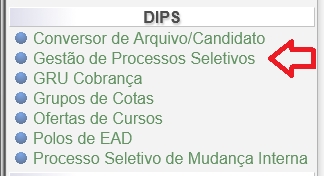
<span style="font-size: 11pt; font-family: Arial,sans-serif; color: #000000; background-color: transparent; font-weight: 400; font-style: normal; font-variant: normal; text-decoration: none; vertical-align: baseline; white-space: pre-wrap;">Acessar o menu DIPS/Gestão de processos Seletivos:</span>

<span style="font-size: 11pt; font-family: Arial,sans-serif; color: #000000; background-color: transparent; font-weight: 400; font-style: normal; font-variant: normal; text-decoration: none; vertical-align: baseline; white-space: pre-wrap;"><span style="border: medium; display: inline-block; overflow: hidden; width: 324px; height: 176px;">![](https://lh7-rt.googleusercontent.com/docsz/AD_4nXfTBSicwl6uvsf8j7GIl4XNmjpAC9QQDSMnpwv6-ovZXkjtv4oi1o9DAu7m_7hJ8Dta5xizR6ci1yO90cw2gLO7SUDFbBt-ulfJ9wXKO7GbPWehLSOi7e5njZpL7PanwxTzqHiLg0C6Vjta9TbKr2_f9AU7?key=ZnMJxDaRwwLomHzj3Tz0Dg)</span></span>

figura 1 - Gestão de Processos Seletivos

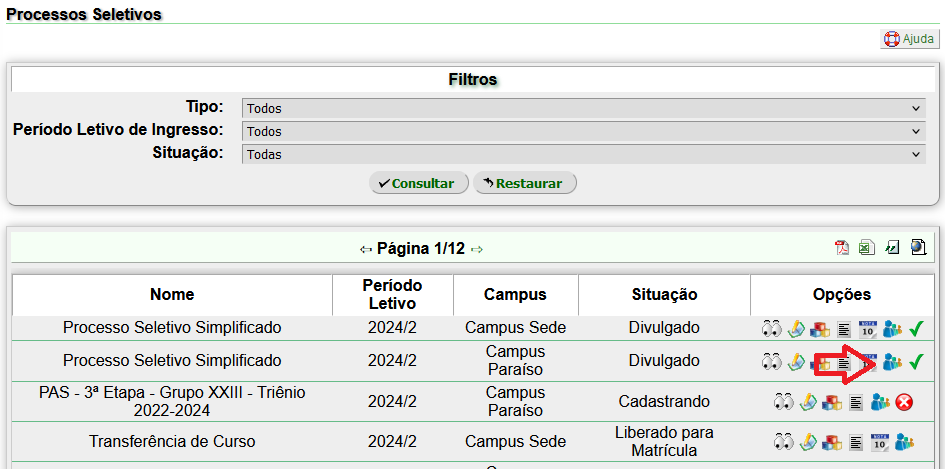
<span style="font-size: 11pt; font-family: Arial,sans-serif; color: #000000; background-color: transparent; font-weight: 400; font-style: normal; font-variant: normal; text-decoration: none; vertical-align: baseline; white-space: pre-wrap;">Acessar os candidatos do processo seletivo</span>

<span style="font-size: 11pt; font-family: Arial,sans-serif; color: #000000; background-color: transparent; font-weight: 400; font-style: normal; font-variant: normal; text-decoration: none; vertical-align: baseline; white-space: pre-wrap;"><span style="border: medium; display: inline-block; overflow: hidden; width: 624px; height: 309px;">![](https://lh7-rt.googleusercontent.com/docsz/AD_4nXdrUnaurhq5CQNdEU9hB0-sScDU3riYf8U8QGVFIOoBeRK8axXvPQRORbJqxt4w9j3z9oiS842_veQUK1LM2KKAoi1AgH2r3XHrx_C6iFg3sajVjfpk979GdktN3WyogrpBn4aaUc8JMgU2pVO723l-yZNY?key=ZnMJxDaRwwLomHzj3Tz0Dg)</span></span>

figura 2 - Candidatos do Processo Seletivo

<span style="font-size: 11pt; font-family: Arial,sans-serif; color: #000000; background-color: transparent; font-weight: 400; font-style: normal; font-variant: normal; text-decoration: none; vertical-align: baseline; white-space: pre-wrap;">Para visualizar todos recursos cadastrados, </span> <span style="font-size: 11pt; font-family: Arial,sans-serif; color: #000000; background-color: transparent; font-weight: 400; font-style: normal; font-variant: normal; text-decoration: none; vertical-align: baseline; white-space: pre-wrap;">no item “Etapa de Classificação”, </span><span style="font-size: 11pt; font-family: Arial,sans-serif; color: #000000; background-color: transparent; font-weight: 400; font-style: normal; font-variant: normal; text-decoration: none; vertical-align: baseline; white-space: pre-wrap;">alterar o campo "Solicitou Recurso" para o valor “Sim” e clicar em “Consultar”;</span>

<span style="font-size: 11pt; font-family: Arial,sans-serif; color: #000000; background-color: transparent; font-weight: 400; font-style: normal; font-variant: normal; text-decoration: none; vertical-align: baseline; white-space: pre-wrap;"><span style="border: medium; display: inline-block; overflow: hidden; width: 624px; height: 67px;">![](https://lh7-rt.googleusercontent.com/docsz/AD_4nXewlp9yIgxNn6V_7y7izj_upIVPwmFuKWbJ0AmtLCCRPwOlkECqM65QOl5VEGX3VADKdqqFZzJDE7GFFaC6251NOBqiT3zJJJ7u9y_dDJXdnmTbDbVv7T1HgK_BqM7kVl87nd0eocKw_wby2SfuPvsKqLjv?key=ZnMJxDaRwwLomHzj3Tz0Dg)</span></span>

figura 3 - Listar Candidatos que Solicitaram Recurso

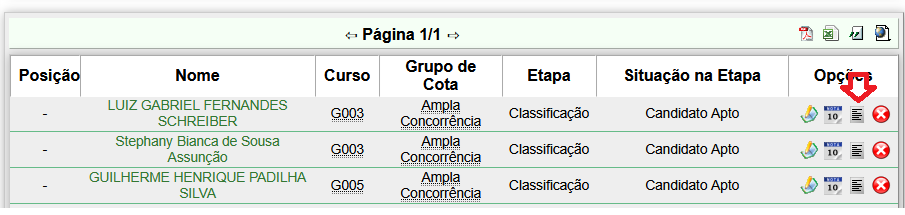
<span style="font-size: 11pt; font-family: Arial,sans-serif; color: #000000; background-color: transparent; font-weight: 400; font-style: normal; font-variant: normal; text-decoration: none; vertical-align: baseline; white-space: pre-wrap;">Serão exibidos todos os candidatos que cadastraram recursos;</span>

[![image-1753302913830.png](https://kb.ufla.br/uploads/images/gallery/2025-07/scaled-1680-/FfKsoiYvRQiVsAQ2-image-1753302913830.png)](https://kb.ufla.br/uploads/images/gallery/2025-07/FfKsoiYvRQiVsAQ2-image-1753302913830.png)

figura 4 - Lista de Candidatos que Solicitaram Recurso

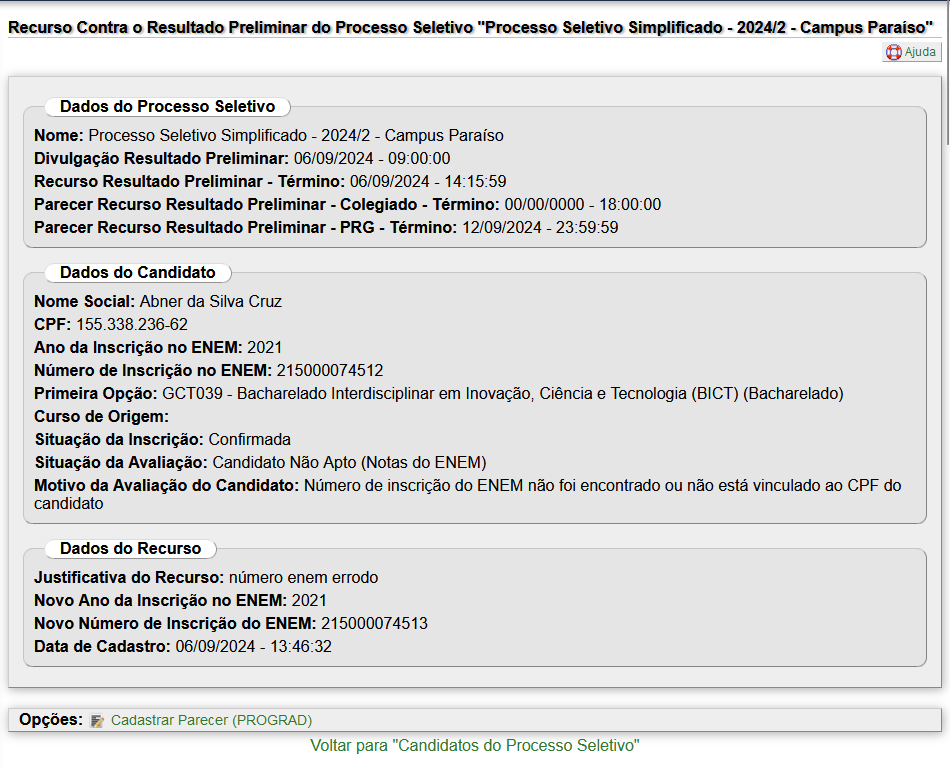
<span style="font-size: 11pt; font-family: Arial,sans-serif; color: #000000; background-color: transparent; font-weight: 400; font-style: normal; font-variant: normal; text-decoration: none; vertical-align: baseline; white-space: pre-wrap;">Para acessar o recurso de um candidato específico, clique no ícone de Recurso</span>

<span style="font-size: 11pt; font-family: Arial,sans-serif; color: #000000; background-color: transparent; font-weight: 400; font-style: normal; font-variant: normal; text-decoration: none; vertical-align: baseline; white-space: pre-wrap;"><span style="border: medium; display: inline-block; overflow: hidden; width: 624px; height: 504px;">![](https://lh7-rt.googleusercontent.com/docsz/AD_4nXfyeVpkfn63Uirbvsdgec1f7P9_izSK056D5QR52aBmn-xVdgug4cifcKzuwXgSh08qPpeETDxOJZAxb9opwboSZ_alpIodjKb0J-mjGCGI59TQ0omt0GdYSIozYD0Rk9z7uaKxhRZk3ZJPtlhZGv5cW3Ec?key=ZnMJxDaRwwLomHzj3Tz0Dg)</span></span>

figura 5 - Recurso de Candidato

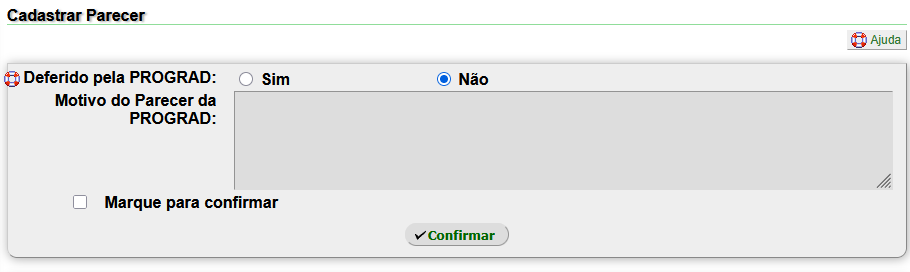
<span style="font-size: 11pt; font-family: Arial,sans-serif; color: #000000; background-color: transparent; font-weight: 400; font-style: normal; font-variant: normal; text-decoration: none; vertical-align: baseline; white-space: pre-wrap;">Para <span class="il">cadastrar</span> um <span class="il">parecer</span>, basta clicar em "Opções: <span class="il">Cadastrar Parecer</span> (PROGRAD)"</span>

[![image-1753303071083.png](https://kb.ufla.br/uploads/images/gallery/2025-07/scaled-1680-/4CoSiKQL4mxiCwX7-image-1753303071083.png)](https://kb.ufla.br/uploads/images/gallery/2025-07/4CoSiKQL4mxiCwX7-image-1753303071083.png)

figura 6 - Cadastrar parecer sobre o recurso de candidato