# Como Gerenciar Chamados no GLPI

<span style="font-size: 15pt; font-family: Arial; color: #404040; background-color: #fcfcfc; font-weight: bold; font-style: normal; font-variant: normal; text-decoration: none; vertical-align: baseline; white-space: pre-wrap;">Sumário</span>

<span style="font-size: 11pt; font-family: Arial; color: #000000; background-color: transparent; font-weight: bold; font-style: normal; font-variant: normal; text-decoration: none; vertical-align: baseline; white-space: pre-wrap;">Diferença entre “requisição” e “incidente”</span>

<span style="font-size: 11pt; font-family: Arial; color: #000000; background-color: transparent; font-weight: bold; font-style: normal; font-variant: normal; text-decoration: none; vertical-align: baseline; white-space: pre-wrap;">Tela Inicial do GLPI</span>

<span style="font-size: 11pt; font-family: Arial; color: #000000; background-color: transparent; font-weight: bold; font-style: normal; font-variant: normal; text-decoration: none; vertical-align: baseline; white-space: pre-wrap;">Identificado os seus chamados</span>

<span style="font-size: 11pt; font-family: Arial; color: #000000; background-color: transparent; font-weight: bold; font-style: normal; font-variant: normal; text-decoration: none; vertical-align: baseline; white-space: pre-wrap;">Informações de um chamado</span>

<span style="font-size: 11pt; font-family: Arial; color: #000000; background-color: transparent; font-weight: bold; font-style: normal; font-variant: normal; text-decoration: none; vertical-align: baseline; white-space: pre-wrap;">Inserindo notas no chamado</span>

<span style="font-size: 11pt; font-family: Arial; color: #000000; background-color: transparent; font-weight: bold; font-style: normal; font-variant: normal; text-decoration: none; vertical-align: baseline; white-space: pre-wrap;">Pedindo aprovação para atender chamado</span>

<span style="font-size: 11pt; font-family: Arial; color: #000000; background-color: transparent; font-weight: bold; font-style: normal; font-variant: normal; text-decoration: none; vertical-align: baseline; white-space: pre-wrap;">Solucionando um chamado</span>

<span style="font-size: 11pt; font-family: Arial; color: #000000; background-color: transparent; font-weight: bold; font-style: normal; font-variant: normal; text-decoration: none; vertical-align: baseline; white-space: pre-wrap;">Enviando tarefas para um colega, a partir de um chamado</span>

<span style="font-size: 11pt; font-family: Arial; color: #000000; background-color: transparent; font-weight: bold; font-style: normal; font-variant: normal; text-decoration: none; vertical-align: baseline; white-space: pre-wrap;">Consultar chamados</span>

<span style="font-size: 11pt; font-family: Arial; color: #000000; background-color: transparent; font-weight: bold; font-style: normal; font-variant: normal; text-decoration: none; vertical-align: baseline; white-space: pre-wrap;">Criar um chamado para terceiros</span>

<span style="font-size: 11pt; font-family: Arial; color: #000000; background-color: transparent; font-weight: bold; font-style: normal; font-variant: normal; text-decoration: none; vertical-align: baseline; white-space: pre-wrap;">Informações gerais</span>

<span style="font-size: 11pt; font-family: Arial; color: #000000; background-color: transparent; font-weight: bold; font-style: normal; font-variant: normal; text-decoration: none; vertical-align: baseline; white-space: pre-wrap;">Processo de controle e configuração das câmeras e switchs no GLPI &amp; Zabbix</span>

<span style="font-size: 16pt; font-family: Arial; color: #404040; background-color: #fcfcfc; font-weight: 400; font-style: normal; font-variant: normal; text-decoration: none; vertical-align: baseline; white-space: pre-wrap;">1 - Diferença entre “</span><span style="font-size: 16pt; font-family: Arial; color: #404040; background-color: #fcfcfc; font-style: normal; font-variant: normal; text-decoration: none; vertical-align: baseline; white-space: pre-wrap;">requisição</span><span style="font-size: 16pt; font-family: Arial; color: #404040; background-color: #fcfcfc; font-style: normal; font-variant: normal; text-decoration: none; vertical-align: baseline; white-space: pre-wrap;">” e “</span><span style="font-size: 16pt; font-family: Arial; color: #404040; background-color: #fcfcfc; font-style: normal; font-variant: normal; text-decoration: none; vertical-align: baseline; white-space: pre-wrap;">incidente</span><span style="font-size: 16pt; font-family: Arial; color: #404040; background-color: #fcfcfc; font-style: normal; font-variant: normal; text-decoration: none; vertical-align: baseline; white-space: pre-wrap;">”</span>

<span style="font-size: 11pt; font-family: Arial; color: #404040; background-color: #fcfcfc; font-weight: 400; font-style: normal; font-variant: normal; text-decoration: none; vertical-align: baseline; white-space: pre-wrap;">No GLPI há dois tipos de chamados (</span><span style="font-size: 11pt; font-family: Arial; color: #404040; background-color: #fcfcfc; font-weight: bold; font-style: normal; font-variant: normal; text-decoration: none; vertical-align: baseline; white-space: pre-wrap;">incidente</span><span style="font-size: 11pt; font-family: Arial; color: #404040; background-color: #fcfcfc; font-weight: 400; font-style: normal; font-variant: normal; text-decoration: none; vertical-align: baseline; white-space: pre-wrap;"> e </span><span style="font-size: 11pt; font-family: Arial; color: #404040; background-color: #fcfcfc; font-weight: bold; font-style: normal; font-variant: normal; text-decoration: none; vertical-align: baseline; white-space: pre-wrap;">requisição)</span><span style="font-size: 11pt; font-family: Arial; color: #404040; background-color: #fcfcfc; font-weight: 400; font-style: normal; font-variant: normal; text-decoration: none; vertical-align: baseline; white-space: pre-wrap;">: </span>

- <span style="font-size: 11pt; font-family: Arial; color: #404040; background-color: #fcfcfc; font-weight: bold; font-style: normal; font-variant: normal; text-decoration: none; vertical-align: baseline; white-space: pre-wrap;">Incidente</span><span style="font-size: 11pt; font-family: Arial; color: #404040; background-color: #fcfcfc; font-weight: 400; font-style: normal; font-variant: normal; text-decoration: none; vertical-align: baseline; white-space: pre-wrap;"> é um evento que não seja parte da operação padrão de um serviço e que causa, ou pode causar, uma interrupção ou redução na qualidade daquele serviço. </span>
- <span style="font-size: 11pt; font-family: Arial; color: #404040; background-color: #fcfcfc; font-weight: bold; font-style: normal; font-variant: normal; text-decoration: none; vertical-align: baseline; white-space: pre-wrap;">Requisição</span><span style="font-size: 11pt; font-family: Arial; color: #404040; background-color: #fcfcfc; font-weight: 400; font-style: normal; font-variant: normal; text-decoration: none; vertical-align: baseline; white-space: pre-wrap;"> é uma solicitação para alterar alguma configuração em relação a um serviço de TI, tais como: troca de senha, concessão de direitos de acesso lógico, criação de um site, manutenção de um computador, etc.</span>

#### <span style="font-size: 16pt; font-family: Arial; color: #404040; background-color: #fcfcfc; font-weight: 400; font-style: normal; font-variant: normal; text-decoration: none; vertical-align: baseline; white-space: pre-wrap;">2 - Tela Inicial do GLPI </span>

<span style="font-size: 11pt; font-family: Arial; color: #404040; background-color: #fcfcfc; font-weight: 400; font-style: normal; font-variant: normal; text-decoration: none; vertical-align: baseline; white-space: pre-wrap;"><span style="border: none; display: inline-block; overflow: hidden; width: 625px; height: 244px;">![](https://lh3.googleusercontent.com/VaoA4zyl--ZNifRsWW8dWw1MeCamyGYrN_xSinbhfPUxTSJstBR5ejXhjTTsfSRBPuHnJ8G8FyvwCimS4CWGcpfRnTFbALczENL1qxbsP974UpzlA0UJQHWCDkTxDyD044RBD3ZNAGriEIfikUb8IQ)</span></span>

#### <span style="font-size: 16pt; font-family: Arial; color: #404040; background-color: #fcfcfc; font-weight: 400; font-style: normal; font-variant: normal; text-decoration: none; vertical-align: baseline; white-space: pre-wrap;">3 - Identificado os seus chamados</span>

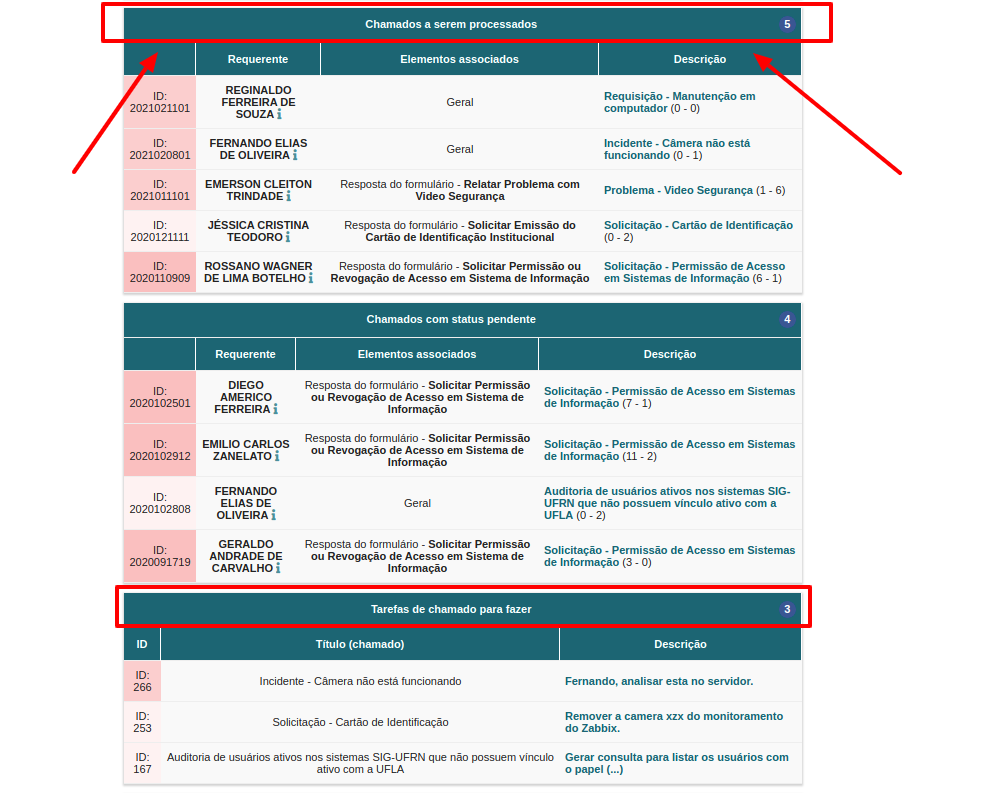
<span style="font-size: 11pt; font-family: Arial; color: #404040; background-color: #fcfcfc; font-weight: 400; font-style: normal; font-variant: normal; text-decoration: none; vertical-align: baseline; white-space: pre-wrap;">Para atender um chamado no GLPI basta acessar a seção “chamados a serem processados”, na tela inicial. As tarefas de um chamado podem ser acessadas na seção “tarefas de chamado para fazer”, quando alguém associa uma tarefa a você. Para acessar o chamado basta acionar o link da coluna descrição, como ilustrado da imagem a seguir:</span>

<span style="font-size: 11pt; font-family: Arial; color: #404040; background-color: #fcfcfc; font-weight: 400; font-style: normal; font-variant: normal; text-decoration: none; vertical-align: baseline; white-space: pre-wrap;"><span style="border: none; display: inline-block; overflow: hidden; width: 625px; height: 496px;">![](https://lh5.googleusercontent.com/iEI4bMPWGiZERQUsbNFhbDgdD9UBL2x56oq4Eqy9KpRI4oMwdmK-dwJ8SawFMSd4IivaWgIiTLbfbGYw3ljFcHsknIoxfFlRg_4lTvZKj_UvP0dppjOPBl5Ag1PlIY4qlM8H99xopRqLBXR-8aKncQ)</span></span>

#### <span style="font-size: 16pt; font-family: Arial; color: #404040; background-color: #fcfcfc; font-weight: 400; font-style: normal; font-variant: normal; text-decoration: none; vertical-align: baseline; white-space: pre-wrap;">4 - Informações de um chamado </span>

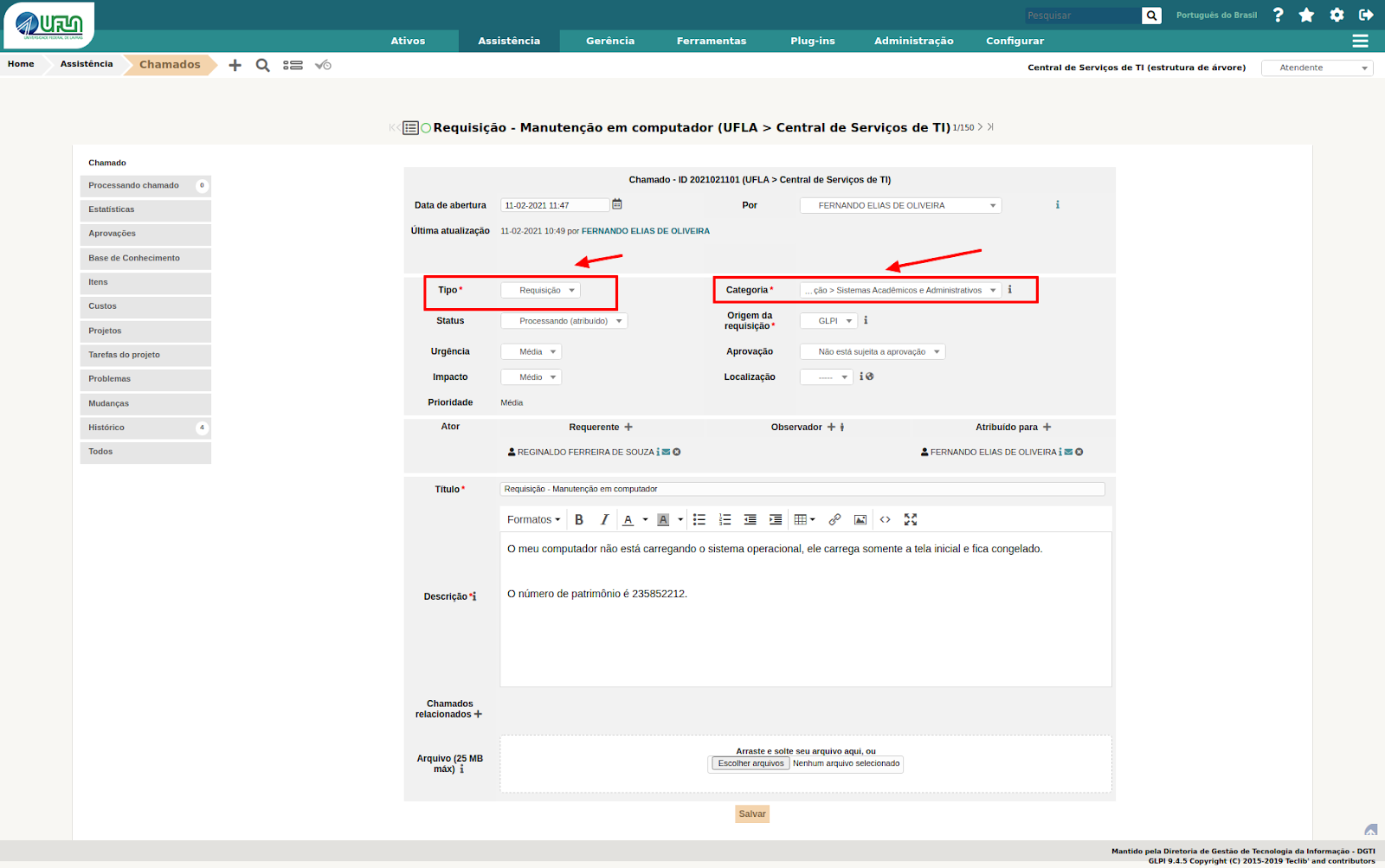
<span style="font-size: 11pt; font-family: Arial; color: #404040; background-color: #fcfcfc; font-weight: 400; font-style: normal; font-variant: normal; text-decoration: none; vertical-align: baseline; white-space: pre-wrap;">Na aba “chamado” os atendentes podem editar informações de um chamado específico, enquanto o chamado não estiver solucionado, como pode ser visto na imagem a seguir. Dois detalhes devem ser verificados no atendimento dos chamados: “Tipo” e “Categoria”. Em relação ao “Tipo” deve ser verificado se o chamado do chamado está de acordo com o tipo do chamado (requisição ou incidente). Já em relação a “Categoria” deve ser verificado se a categoria do chamado corresponde com o conteúdo do chamado. Essa verificação é feita para manter uma catalogação fiel dos chamados, pois serão utilizados em indicadores e mensurações de atendimentos.  
  
</span>

<span style="font-size: 11pt; font-family: Arial; color: #404040; background-color: #fcfcfc; font-weight: 400; font-style: normal; font-variant: normal; text-decoration: none; vertical-align: baseline; white-space: pre-wrap;"><span style="border: none; display: inline-block; overflow: hidden; width: 625px; height: 392px;">![](https://lh5.googleusercontent.com/wrJ7YPsX5Ca_Mq3ybahvmYOUpzVrj_Ft8Jskqe04I6gpGcjJraB6wmV_gyxkplLWxh7UuQ9EY4MpDEbccapsYOE8b1NVjJgZQHRuH8TwjDo1R9FNZKlXWJszbyjz6uKGDroTHziihqxGX6SP4Xea2w)  
  
</span></span>

<span style="font-size: 11pt; font-family: Arial; color: #404040; background-color: #fcfcfc; font-weight: 400; font-style: normal; font-variant: normal; text-decoration: none; vertical-align: baseline; white-space: pre-wrap;">É possível atribuir um chamado para um atendente da DGTI por meio do campo “Atribuído para +” e inserir qualquer pessoa para observar o chamado (em “Observador por +”), veja na imagem a seguir:</span>

<span style="font-size: 11pt; font-family: Arial; color: #404040; background-color: #fcfcfc; font-weight: 400; font-style: normal; font-variant: normal; text-decoration: none; vertical-align: baseline; white-space: pre-wrap;"><span style="border: none; display: inline-block; overflow: hidden; width: 625px; height: 241px;">![](https://lh3.googleusercontent.com/2iU_JvCYJTD79-rj5qyIJvsFXq-gUqGvuMqiQC2ESYwWDVw7ReU3x0phd74BMyKJOHu2LvFjjeSctzc0opK1XTSQUuhPTRv1JIWFNR0cN8iX3ODO3wAPZcWk_6OWNXedcQ0FG96bnRiv0pR3kytEgQ)</span></span>

<span style="font-size: 11pt; font-family: Arial; color: #ff0000; background-color: #fcfcfc; font-weight: bold; font-style: normal; font-variant: normal; text-decoration: none; vertical-align: baseline; white-space: pre-wrap;">  
IMPORTANTE</span><span style="font-size: 11pt; font-family: Arial; color: #404040; background-color: #fcfcfc; font-weight: 400; font-style: normal; font-variant: normal; text-decoration: none; vertical-align: baseline; white-space: pre-wrap;">: No GLPI, o solicitante é tratado como “Requerente” e o atendente é um “Técnico”.</span>

#### <span style="font-size: 16pt; font-family: Arial; color: #404040; background-color: #fcfcfc; font-weight: 400; font-style: normal; font-variant: normal; text-decoration: none; vertical-align: baseline; white-space: pre-wrap;">5 - Inserindo notas no chamado </span>

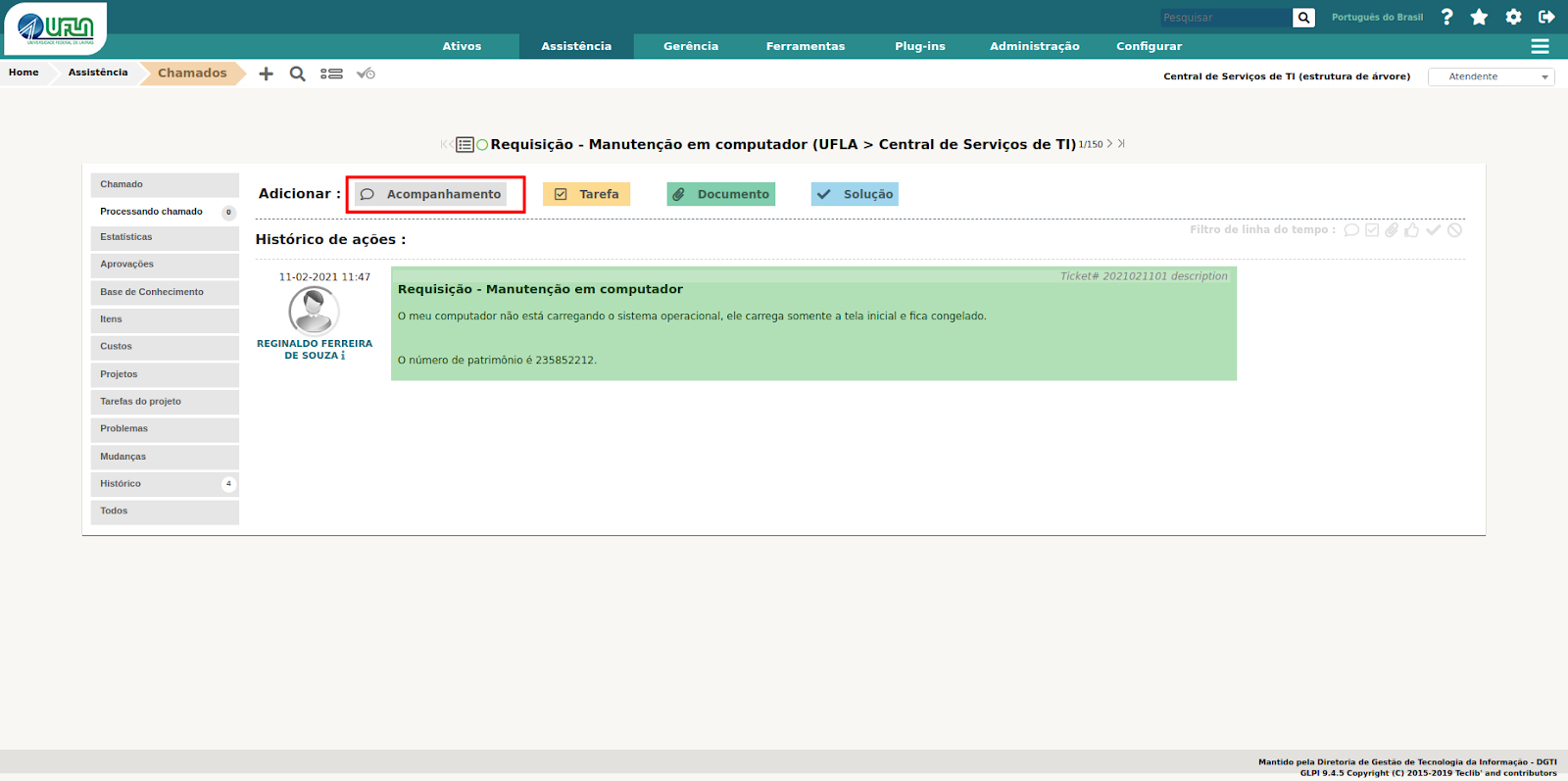
<span style="font-size: 11pt; font-family: Arial; color: #404040; background-color: #fcfcfc; font-weight: 400; font-style: normal; font-variant: normal; text-decoration: none; vertical-align: baseline; white-space: pre-wrap;">A seção “Processando Chamado” é onde os chamados são gerenciados e visualizados de fato. Nessa seção são cadastrados os objetos de análise e resposta dos chamados, observe na imagem a seguir.</span>

<span style="font-size: 11pt; font-family: Arial; color: #404040; background-color: #fcfcfc; font-weight: 400; font-style: normal; font-variant: normal; text-decoration: none; vertical-align: baseline; white-space: pre-wrap;">A principal forma de manter os solicitantes informados sobre o andamento dos chamados é inserindo notas de “Acompanhamento”. Desta forma é recomendado que sempre seja feita a inserção de notas de acompanhamento para manter o solicitante informado sobre o andamento do chamado.</span>

<span style="font-size: 11pt; font-family: Arial; color: #404040; background-color: #fcfcfc; font-weight: 400; font-style: normal; font-variant: normal; text-decoration: none; vertical-align: baseline; white-space: pre-wrap;"><span style="border: none; display: inline-block; overflow: hidden; width: 588px; height: 255px;">![](https://lh4.googleusercontent.com/A6ad5TPGAFDsixheCIvlhtMATKfnU-VN48XZBrNHBotgibDrMJJW3lzuDrSSg9rtzj0KV3xCOEEHoYDmsEyC39ieL879aO6G5mZiRTFWp2fKBDDGqA3gvwFsUMX-rop39gD4DJmpJVNzcuddeiB8VA)</span></span>

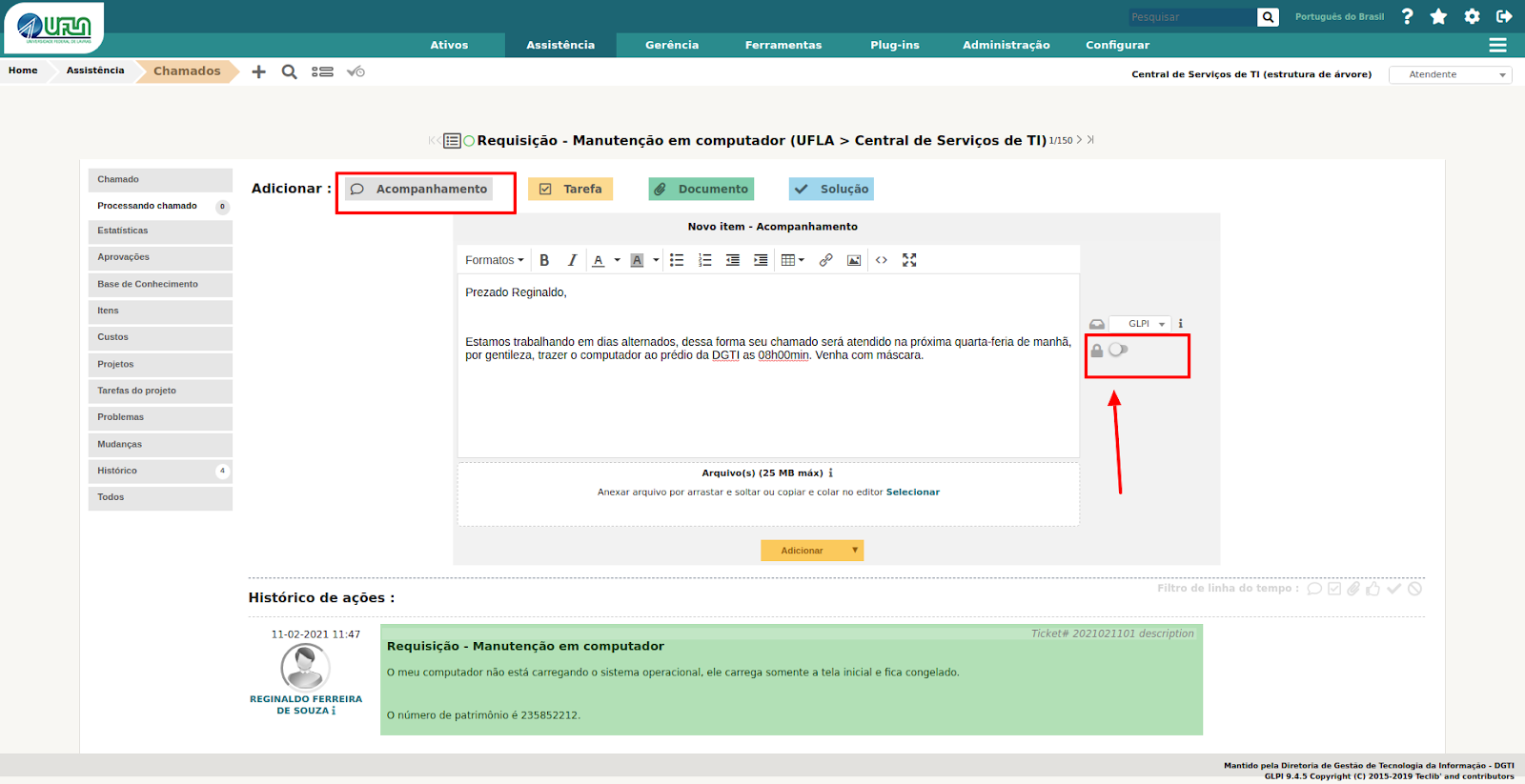
<span style="font-size: 11pt; font-family: Arial; color: #404040; background-color: #fcfcfc; font-weight: 400; font-style: normal; font-variant: normal; text-decoration: none; vertical-align: baseline; white-space: pre-wrap;">Para exibir nota de acompanhamento somente para os atendentes da DGTI é necessário acionar o </span><span style="font-size: 11pt; font-family: Arial; color: #404040; background-color: #fcfcfc; font-weight: bold; font-style: normal; font-variant: normal; text-decoration: none; vertical-align: baseline; white-space: pre-wrap;">ícone de cadeado</span><span style="font-size: 11pt; font-family: Arial; color: #404040; background-color: #fcfcfc; font-weight: 400; font-style: normal; font-variant: normal; text-decoration: none; vertical-align: baseline; white-space: pre-wrap;"> no formulário de cadastro de notas de acompanhamento, conforme na imagem a seguir:</span>

<span style="font-size: 11pt; font-family: Arial; color: #404040; background-color: #fcfcfc; font-weight: 400; font-style: normal; font-variant: normal; text-decoration: none; vertical-align: baseline; white-space: pre-wrap;"><span style="border: none; display: inline-block; overflow: hidden; width: 555px; height: 285px;">![](https://lh5.googleusercontent.com/5VAa60bJuaUIXdXB4J9N-AXNhOpezIbk9cJilFrctAOVuRiZCMVoqidaI0YpasS45fFzhhjsb0NsOPZvOAowJMJXHeksf_YqYmujDPD_4XoyLJXIBkD6Jne8f7RkQZ3-vGr8PXCuDvqw3VZZc3_qnA)</span></span>

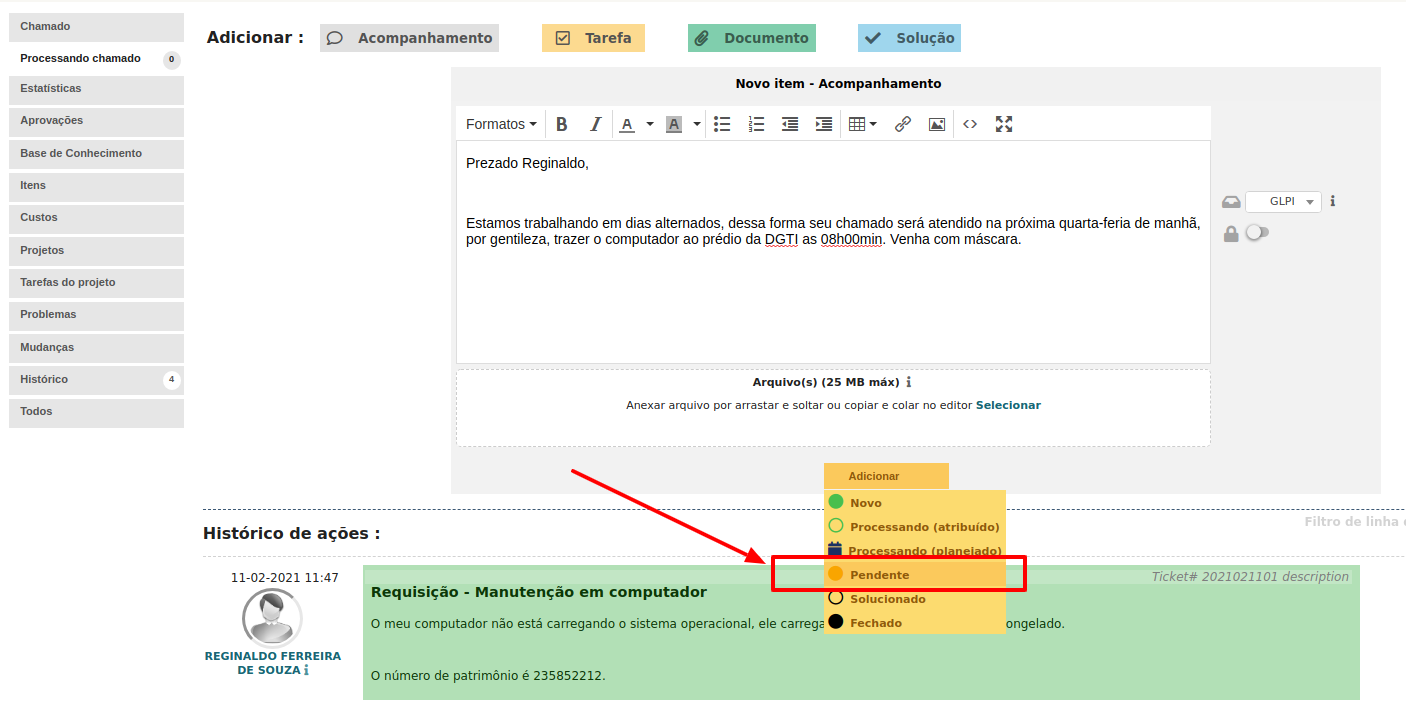
<span style="font-size: 11pt; font-family: Arial; color: #404040; background-color: #fcfcfc; font-weight: 400; font-style: normal; font-variant: normal; text-decoration: none; vertical-align: baseline; white-space: pre-wrap;">Se por algum motivo for necessário marcar o chamado como pendente, a partir de um acompanhamento, basta selecionar a opção “Pendente” no botão de “Adicionar” do formulário de cadastro de acompanhamentos. O chamado será atribuído ao técnico quando o solicitante cadastrar uma nota no chamado, se este estiver com o status pendente, observe na imagem a seguir:</span>

<span style="font-size: 11pt; font-family: Arial; color: #404040; background-color: #fcfcfc; font-weight: 400; font-style: normal; font-variant: normal; text-decoration: none; vertical-align: baseline; white-space: pre-wrap;"><span style="border: none; display: inline-block; overflow: hidden; width: 625px; height: 317px;">![](https://lh3.googleusercontent.com/gEb2tyZmwr_Nz8QV5ZW0Iwvc2vNcDKz7i_dOCeRZxi8ZmbbDFCVupGfiMuBANkXyOYrDIr7DOW0F0zOghp-wInYN1CzFqNCraFg2N-_DV2q8ynnMQNYQ9mT4nR2CrkZcX0ZwRmEui6Sj6jx79jHXJw)</span></span>

#### <span style="font-size: 16pt; font-family: Arial; color: #404040; background-color: #fcfcfc; font-weight: 400; font-style: normal; font-variant: normal; text-decoration: none; vertical-align: baseline; white-space: pre-wrap;">6 - Pedindo aprovação para atender chamado</span>

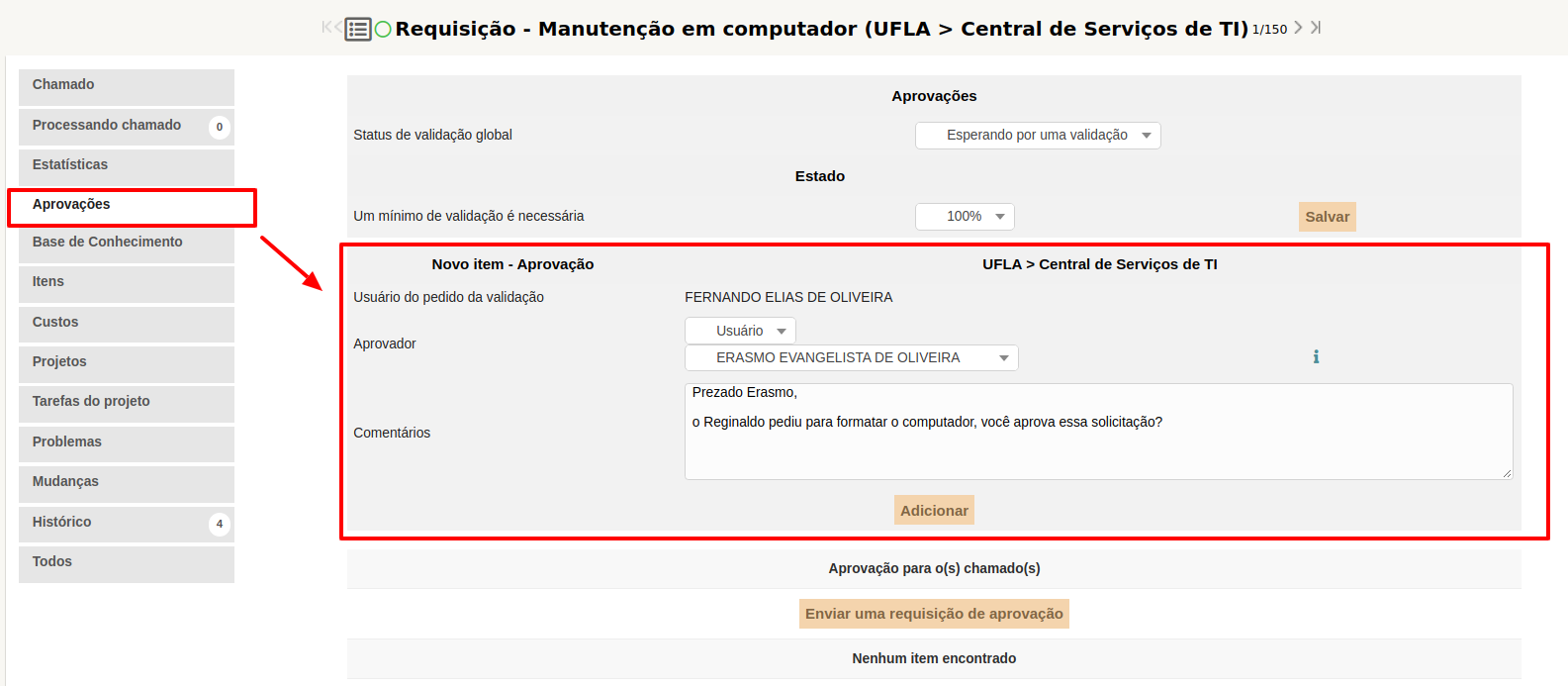
<span style="font-size: 11pt; font-family: Arial; color: #404040; background-color: #fcfcfc; font-weight: 400; font-style: normal; font-variant: normal; text-decoration: none; vertical-align: baseline; white-space: pre-wrap;">Há situações em que é necessário pedir a alguém a validação para atender um chamado, seja chefia, um interessado, ou uma pessoa específica para aprovação. Dessa forma é possível enviar pedidos de aprovação por meio do GLPI, na seção “Aprovações”, conforme ilustra a imagem a seguir. Pode ser informado mais de uma pessoa para aprovação e selecionar qualquer pessoa da UFLA.  
</span>

<span style="font-size: 11pt; font-family: Arial; color: #404040; background-color: #fcfcfc; font-weight: 400; font-style: normal; font-variant: normal; text-decoration: none; vertical-align: baseline; white-space: pre-wrap;"><span style="border: none; display: inline-block; overflow: hidden; width: 625px; height: 273px;">![](https://lh5.googleusercontent.com/3US2OsiXEwsN0YBvlcO1xvZBAdorMxqWQa5uFIZlj_Narzy6mqugkYrCj8Fk3FgLoea2U5zT9vHXgu2PGgH2eaXs3xbEo84MqYqO-1rqBuNfQQwcGbRRMFSt6nZJD-RMKUkw6uykCfhpw_raWYYenQ)</span></span>

#### <span style="font-size: 16pt; font-family: Arial; color: #404040; background-color: #fcfcfc; font-weight: 400; font-style: normal; font-variant: normal; text-decoration: none; vertical-align: baseline; white-space: pre-wrap;">7 - Solucionando um chamado</span>

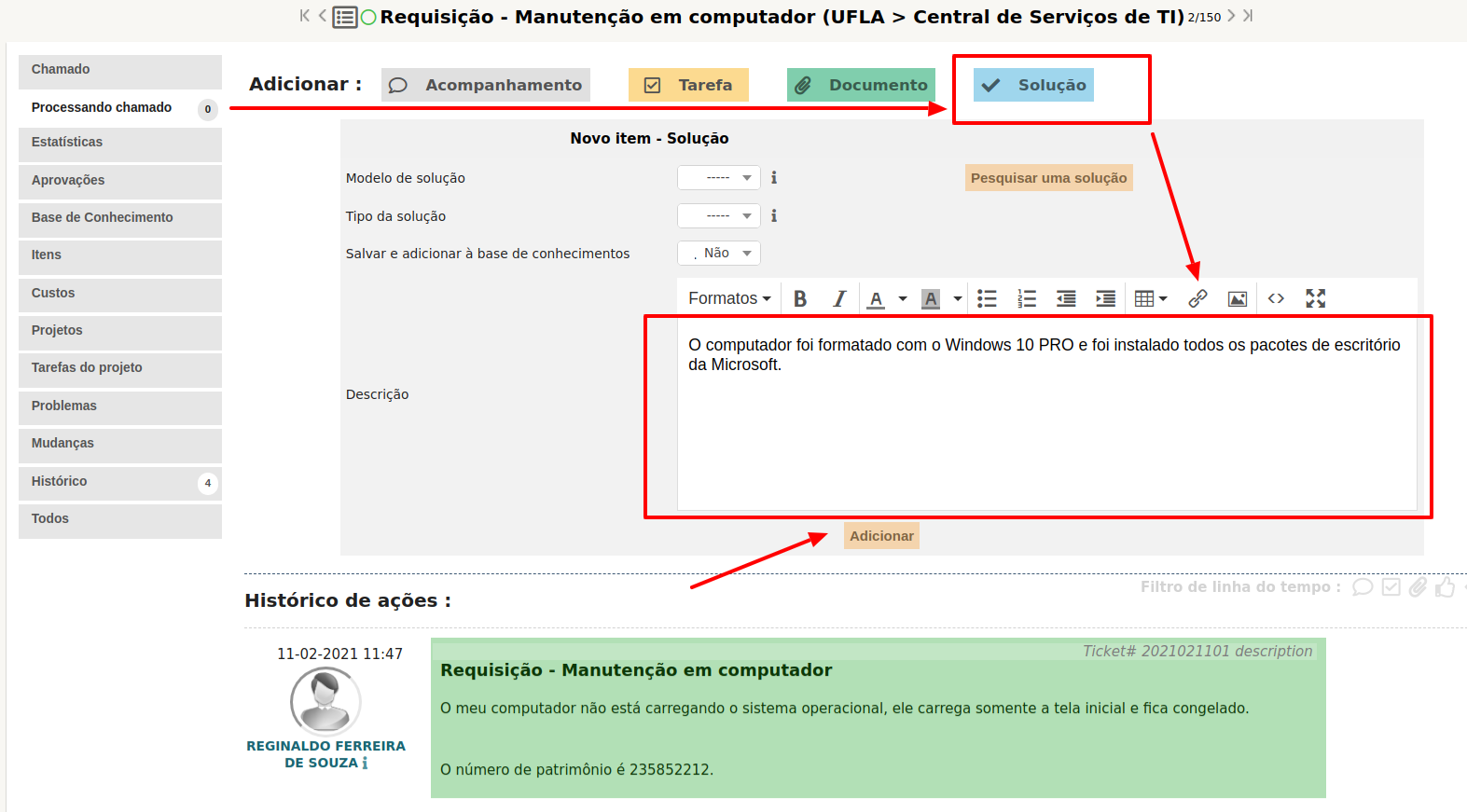
<span style="font-size: 11pt; font-family: Arial; color: #404040; background-color: #fcfcfc; font-weight: 400; font-style: normal; font-variant: normal; text-decoration: none; vertical-align: baseline; white-space: pre-wrap;">Para solucionar um chamado é necessário que o mesmo esteja associado a alguém, veja na imagem a seguir. Além disso é necessário acionar a opção "Solução" da seção “Processando Chamado” e inserir um texto, inteligente, sobre a solução.</span>

<span style="font-size: 11pt; font-family: Arial; color: #404040; background-color: #fcfcfc; font-weight: 400; font-style: normal; font-variant: normal; text-decoration: none; vertical-align: baseline; white-space: pre-wrap;"><span style="border: none; display: inline-block; overflow: hidden; width: 625px; height: 345px;">![](https://lh4.googleusercontent.com/Xu80_KJsz9lRUcU6XgM6VzfqZl03RYHpAeEhyKrGB0mQLc7JrBNikQZm8aIIXRZ2DG7iHrsPjkD_slaFVjXNYssuNoqKryVNYNQg-NQHVoL3mGNIRMMGc9QIaoZlcVxw9n8587aQhJnQV6eYmavypQ)</span></span>

<span style="font-size: 11pt; font-family: Arial; color: #404040; background-color: #fcfcfc; font-weight: 400; font-style: normal; font-variant: normal; text-decoration: none; vertical-align: baseline; white-space: pre-wrap;">Em geral, a solução de um chamado deve ser feita pela equipe da Coordenadoria de Operação e Segurança da Informação (COSI). Em vez de inserir uma nota de solução no chamado do GLPI, insira nota de acompanhamento e retorne o respectivo chamado para a última pessoa da COSI que o encaminhou. Caso seja necessário, insira uma nota de acompanhamento, pública, para o solicitante e uma nota de acompanhamento, privada, para a COSI. Desta forma, o solicitante terá conhecimento da solução por meio da nota de acompanhamento pública. A equipe COSI ficará responsável por inserir a nota de solução do chamado. </span>

<span style="font-size: 11pt; font-family: Arial; color: #404040; background-color: #fcfcfc; font-weight: 400; font-style: normal; font-variant: normal; text-decoration: none; vertical-align: baseline; white-space: pre-wrap;">O chamado pode ser solucionado se julgar que não é necessário retorná-lo para COSI, pois o intuito deste procedimento é manter a equipe de operação, minimamente, informada das mudanças implementadas nos serviços de TI, sem prejudicar a notificação de solução ao solicitante. Mudanças são as alterações em, mas não se limitando a estas: regras de negócios, permissões de acesso, domínios, servidores, estrutura de página, inclusão de grupo de usuários, relatórios e procedimentos de operação.</span>

#### <span style="font-size: 16pt; font-family: Arial; color: #404040; background-color: #fcfcfc; font-weight: 400; font-style: normal; font-variant: normal; text-decoration: none; vertical-align: baseline; white-space: pre-wrap;">8 - Enviando tarefas para um colega, a partir de um chamado</span>

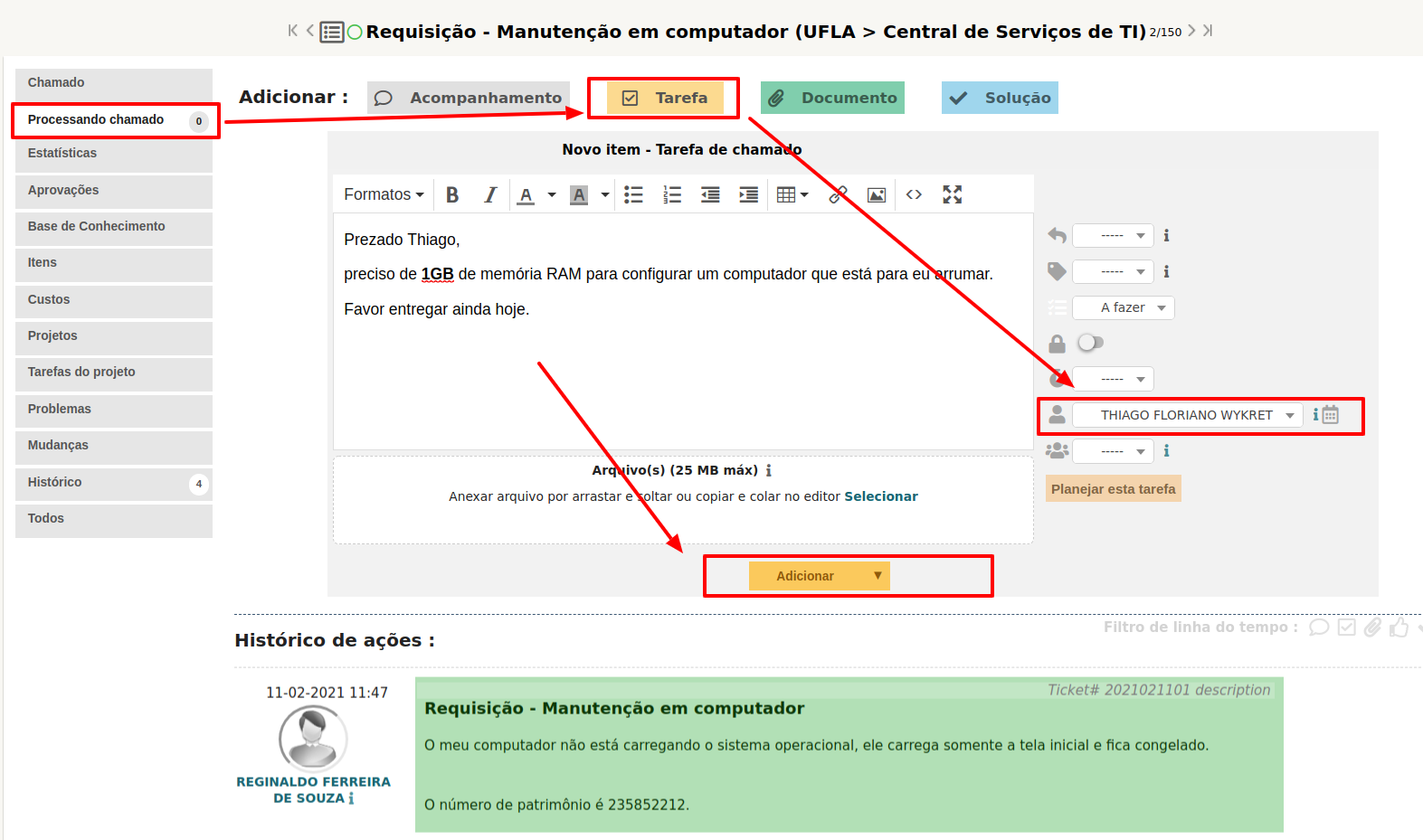
<span style="font-size: 11pt; font-family: Arial; color: #404040; background-color: #fcfcfc; font-weight: 400; font-style: normal; font-variant: normal; text-decoration: none; vertical-align: baseline; white-space: pre-wrap;">Quando lhe for atribuído um chamado cuja solução necessita de uma pequena intervenção de um colega, você pode criar uma tarefa para essa pessoa em vez de lhe atribuir o chamado. A tarefa funciona como um chamado, mas está num chamado específico. A imagem a seguir ilustra a opção para criação de tarefa em um chamado:</span>

<span style="font-size: 11pt; font-family: Arial; color: #404040; background-color: #fcfcfc; font-weight: 400; font-style: normal; font-variant: normal; text-decoration: none; vertical-align: baseline; white-space: pre-wrap;"><span style="border: none; display: inline-block; overflow: hidden; width: 625px; height: 369px;">![](https://lh6.googleusercontent.com/iV2XyMeYBQoW8HbAhshrhQs0UFKOQmDc4vyryiQ_CSb1xSCiYk2cBRDvvTFWnnliLMIZSegI0TbF9OnbzMd6mNr4r_ebq4gl9kW5zBAILcm5LF7zZjuSWrKBheu5pF7DGGoOSC_LIvy9OBV1akfy6A)</span></span>

<span style="font-size: 11pt; font-family: Arial; color: #404040; background-color: #fcfcfc; font-weight: 400; font-style: normal; font-variant: normal; text-decoration: none; vertical-align: baseline; white-space: pre-wrap;">Como mencionado anteriormente, as tarefas são exibidas na seção “Tarefas de chamado para fazer” da página inicial do GLPI.</span>

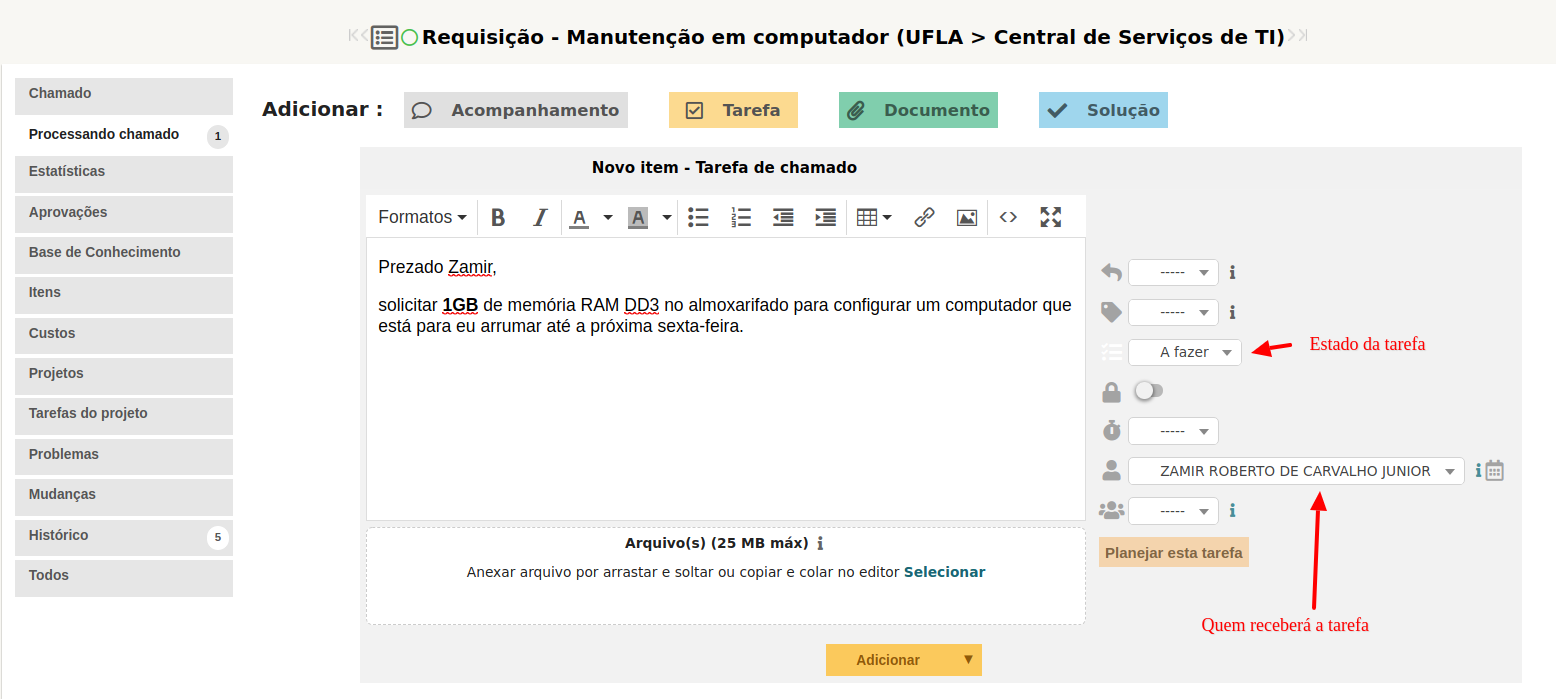
<span style="font-size: 11pt; font-family: Arial; color: #404040; background-color: #fcfcfc; font-weight: 400; font-style: normal; font-variant: normal; text-decoration: none; vertical-align: baseline; white-space: pre-wrap;">Consideremos que um técnico receba um chamado no GLPI solicitando a manutenção de um computador, em que será necessário trocar peças, entretanto a aquisição de peças é com outro técnico. Nesse contexto, o técnico cria uma tarefa no chamado e atribui ao outro técnico responsável por fazer a aquisição. Vale ressaltar que o solicitante visualiza as tarefas, se essas não forem marcadas como privadas. Recomenda-se que o estado da tarefa seja “A FAZER”. </span>
<span style="font-size: 11pt; font-family: Arial; color: #404040; background-color: #fcfcfc; font-weight: 400; font-style: normal; font-variant: normal; text-decoration: none; vertical-align: baseline; white-space: pre-wrap;"><span style="border: none; display: inline-block; overflow: hidden; width: 625px; height: 281px;">![](https://lh3.googleusercontent.com/N0lqDOBPZUV25GbfMpMrLu_SMKMxkZ3Xh-P3PG84s_nlFr0TFDnz-Y8uLaJ0WpJMZp4YCVGy8uEzeyab7vqgXRQZkRYFQna2FhZ9tPNzBGscXdhlrqCBsPYRuhuhdUfCMWV4bvOgf4TIkDXlX13MNQ)</span></span>

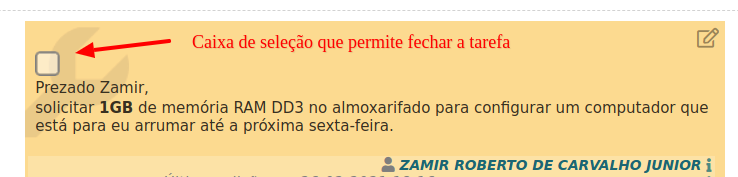
<span style="font-size: 11pt; font-family: Arial; color: #404040; background-color: #fcfcfc; font-weight: 400; font-style: normal; font-variant: normal; text-decoration: none; vertical-align: baseline; white-space: pre-wrap;">O técnico conclui a tarefa clicando na “caixa de seleção” referente à tarefa ou selecionando a opção “FEITO” no estado da tarefa, no modo de edição da respectiva tarefa.</span>

<span style="font-size: 11pt; font-family: Arial; color: #404040; background-color: #fcfcfc; font-weight: 400; font-style: normal; font-variant: normal; text-decoration: none; vertical-align: baseline; white-space: pre-wrap;"><span style="border: none; display: inline-block; overflow: hidden; width: 625px; height: 149px;">![](https://lh4.googleusercontent.com/Hp_LXmRhYnnn3MqkR016qSF2dKQOhE8gBEbQhcbLUbuxJP6zQYJ4SEcT8YFPHvsuRq_P8L4nJywwlb0cZhik3BYVWY4JrrwC4II2q-yVH02tFK02dZhlTlEWf6IQzXs0k1TDKnCOwdNwHgsDdqTidQ)</span></span>

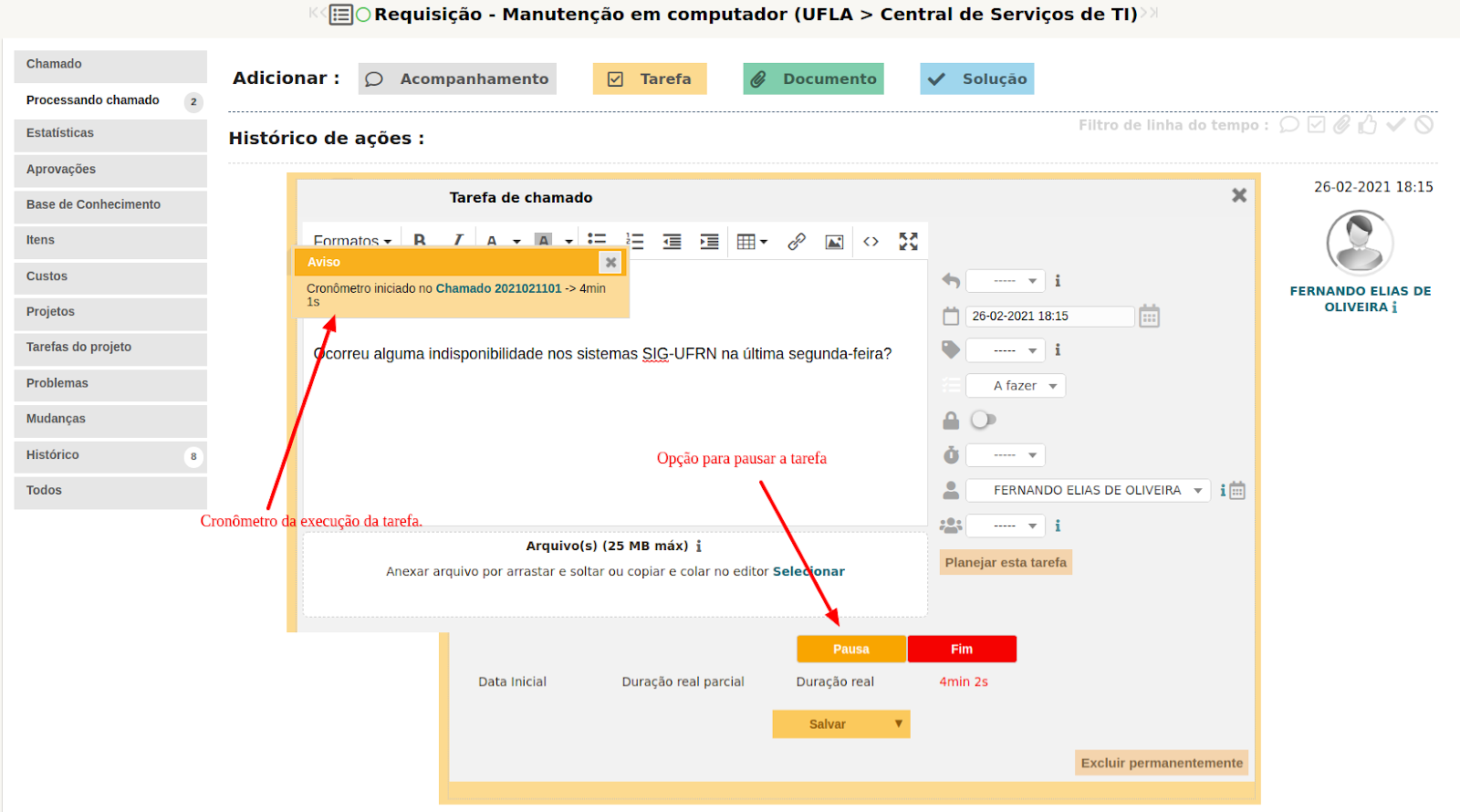
<span style="font-size: 11pt; font-family: Arial; color: #404040; background-color: #fcfcfc; font-weight: 400; font-style: normal; font-variant: normal; text-decoration: none; vertical-align: baseline; white-space: pre-wrap;">Quando o técnico acessa a tarefa no modo edição, que está atribuída para ele, é possível acionar um contador de tempo que vai registrar o tempo gasto para atender aquela tarefa. A contagem do tempo de empenho na tarefa inicia quando o botão "INÍCIO" é acionado. O sistema aciona um cronômetro após iniciar a tarefa. </span>

<span style="font-size: 11pt; font-family: Arial; color: #404040; background-color: #fcfcfc; font-weight: 400; font-style: normal; font-variant: normal; text-decoration: none; vertical-align: baseline; white-space: pre-wrap;">  
</span><span style="font-size: 11pt; font-family: Arial; color: #404040; background-color: #fcfcfc; font-weight: 400; font-style: normal; font-variant: normal; text-decoration: none; vertical-align: baseline; white-space: pre-wrap;"><span style="border: none; display: inline-block; overflow: hidden; width: 625px; height: 293px;">![](https://lh3.googleusercontent.com/rfUWzHdsv5yH0V0Wq6kB7f_VtZBE6GIXtKQM5vnkTPzfLEGzGNRGMevevZog98is0tC7HzA-ZdXLcusG-YjUVsbVHhPsHEoMPER4qUPmdsf699xwcBFey3a_DKFvrq5WDlfNh-qXxvKbgxnSllYUdw)</span></span>

<span style="font-size: 11pt; font-family: Arial; color: #404040; background-color: #fcfcfc; font-weight: 400; font-style: normal; font-variant: normal; text-decoration: none; vertical-align: baseline; white-space: pre-wrap;">Vale ressaltar que o GLPI permite acionar somente uma tarefa por vez. Com isso, para trabalhar em uma segunda tarefa é necessário “PAUSAR” a primeira e em seguida “INICIAR” a segunda tarefa. A tarefa é concluída ao clicar na opção “FEITO”.</span>

<span style="font-size: 11pt; font-family: Arial; color: #404040; background-color: #fcfcfc; font-weight: 400; font-style: normal; font-variant: normal; text-decoration: none; vertical-align: baseline; white-space: pre-wrap;"><span style="border: none; display: inline-block; overflow: hidden; width: 625px; height: 348px;">![](https://lh6.googleusercontent.com/ulT8lKLDoYbfQXnuY8Fa9p__HqZgxAijhUuFRbvUIZm4w8VDeJlKfpZdF1izTdzVH4kqKxyAbVXLIgI3IX_4TKKQ06f1NXOy7mMhT8PGwsi2YMDh266pyBwsAurokhfJyqmKskY20vRcKT5HOgwrYQ)</span></span>

<span style="font-size: 11pt; font-family: Arial; color: #404040; background-color: #fcfcfc; font-weight: 400; font-style: normal; font-variant: normal; text-decoration: none; vertical-align: baseline; white-space: pre-wrap;">Caso deseje fornecer uma resposta relativa a uma tarefa é possível fazer isso no conteúdo da própria tarefa, ou inserir uma nota de acompanhamento no chamado.</span>

<span style="font-size: 11pt; font-family: Arial; color: #404040; background-color: #fcfcfc; font-weight: 400; font-style: normal; font-variant: normal; text-decoration: none; vertical-align: baseline; white-space: pre-wrap;">É possível criar um modelo com texto padrão para a categoria de uma tarefa, a necessidade de criação de templates deve ser comunicada à COSI. O uso de modelo se torna útil quando os conteúdos de um tipo de tarefa é passível de ser padronizado, conforme imagem a seguir:</span>

<span style="font-size: 11pt; font-family: Arial; color: #404040; background-color: #fcfcfc; font-weight: 400; font-style: normal; font-variant: normal; text-decoration: none; vertical-align: baseline; white-space: pre-wrap;"><span style="border: none; display: inline-block; overflow: hidden; width: 625px; height: 247px;">![](https://lh3.googleusercontent.com/dv-SuU71w9btM5tEnPMWQyiW2iE3crinOGSS9Y3uppq8yvnrBHQKAN4DvQIczq-jRu9QgN12mUhODJISB4M4Ntx8hESbIiV9UYYkdtXzoIh3STokWVEV6ru1IquFQuhGxhDn3AIOBhBPHKiXu5Vh1A)</span></span>

<span style="font-size: 11pt; font-family: Arial; color: #404040; background-color: #fcfcfc; font-weight: 400; font-style: normal; font-variant: normal; text-decoration: none; vertical-align: baseline; white-space: pre-wrap;">As tarefas atribuídas a você são exibidas no painel inicial do GLPI, na mesma tela onde são exibidos os chamados atribuídos a você. Dessa forma é necessário consultar periodicamente se há tarefas atribuídas na seção “Tarefas de chamado para fazer”, conforme ilustra a imagem a seguir:</span>

<span style="font-size: 11pt; font-family: Arial; color: #404040; background-color: #fcfcfc; font-weight: 400; font-style: normal; font-variant: normal; text-decoration: none; vertical-align: baseline; white-space: pre-wrap;"><span style="border: none; display: inline-block; overflow: hidden; width: 625px; height: 140px;">![](https://lh3.googleusercontent.com/K3yE60EYle3EY10qTVaTLhgivsEUZzNMR7s3gbTvHQ531bUvbyxJD6XwO8GpYJkUSMf1BZK6_VK6nTRq6yi76xpLiN348z0SIBeiX0MfUOiVzwF2g9PH8VHYQWidMKNCAtJGebaB17pWvD5W9CXL7g)</span></span>

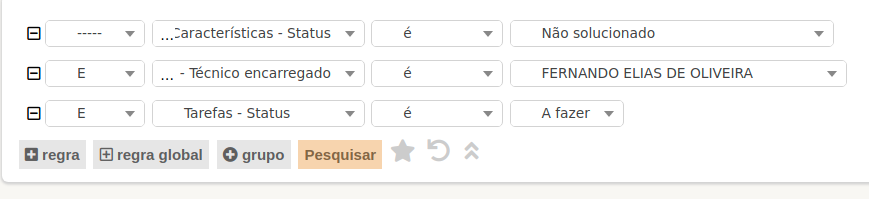
<span style="font-size: 11pt; font-family: Arial; color: #404040; background-color: #fcfcfc; font-weight: 400; font-style: normal; font-variant: normal; text-decoration: none; vertical-align: baseline; white-space: pre-wrap;">As tarefas também podem ser consultadas utilizando o formulário de busca de chamados no caminho “GLPI &gt;&gt; Assistência &gt;&gt; Chamados &gt;&gt; Processando Chamado”, por meio das opções de filtro:</span>

<span style="font-size: 11pt; font-family: Arial; color: #404040; background-color: #fcfcfc; font-weight: 400; font-style: normal; font-variant: normal; text-decoration: none; vertical-align: baseline; white-space: pre-wrap;"><span style="border: none; display: inline-block; overflow: hidden; width: 589px; height: 66px;">![](https://lh3.googleusercontent.com/upa3Q7NIA1DEY41LKgImXRXr5-PESe3hJjjDSHxB9cQJBJ2dmC0hQGb-MB6igVUpPBRdGYAIy2_uBMknHvrqzsGZ5L46b3q61n5LMs2eI68-6PtsW7RfU1dhFd0ZYYxK-Dn2wsAo8_ftBTZJvwJM9Q)</span></span>

<span style="font-size: 11pt; font-family: Arial; color: #404040; background-color: #fcfcfc; font-weight: 400; font-style: normal; font-variant: normal; text-decoration: none; vertical-align: baseline; white-space: pre-wrap;"><span style="border: none; display: inline-block; overflow: hidden; width: 625px; height: 143px;">![](https://lh5.googleusercontent.com/43rTeM67wpf33rbDR8kbqu7cDNvkhOg3Ul6VzdMxZdefgFTZtIJt6x4t3e1Z0acbdxAf9XC01drmHyBGthfM7tL24QIQ4XqJ9nWlqEi1AucYM7ZZO-wGLeRsBTYuPNdvyLBkWDEG-fwEZRnt8nUm-g)</span></span>

#### <span style="font-size: 16pt; font-family: Arial; color: #404040; background-color: #fcfcfc; font-weight: 400; font-style: normal; font-variant: normal; text-decoration: none; vertical-align: baseline; white-space: pre-wrap;">9 - Consultar chamados</span>

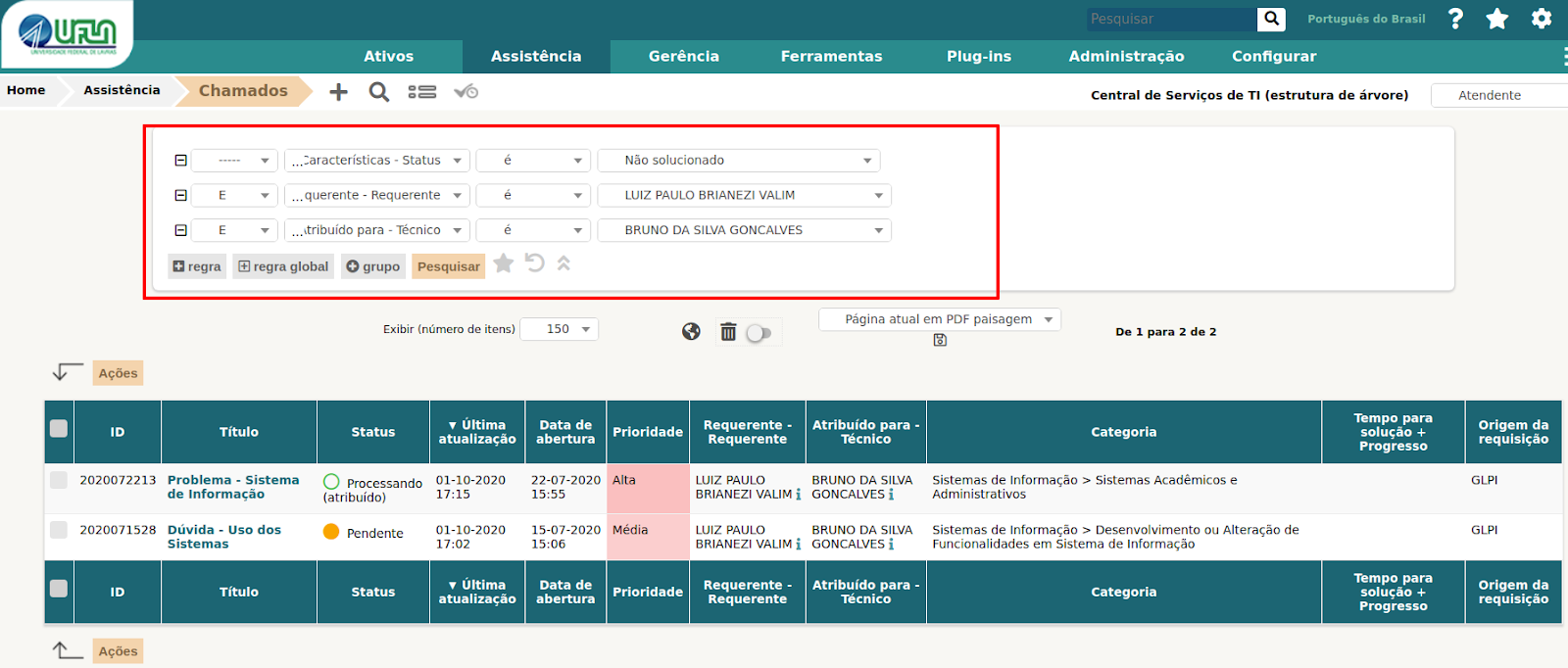
<span style="font-size: 11pt; font-family: Arial; color: #404040; background-color: #fcfcfc; font-weight: 400; font-style: normal; font-variant: normal; text-decoration: none; vertical-align: baseline; white-space: pre-wrap;">Para consultar chamados basta acessar o caminho “Assistência &gt;&gt; Chamados”, na tela exibida é possível fazer diversas combinações de filtros. Vale ressaltar para uso dos filtros que o solicitante é descrito como requerente e o atendente é descrito nos filtros como técnico.</span>

<span style="font-size: 11pt; font-family: Arial; color: #404040; background-color: #fcfcfc; font-weight: 400; font-style: normal; font-variant: normal; text-decoration: none; vertical-align: baseline; white-space: pre-wrap;"><span style="border: none; display: inline-block; overflow: hidden; width: 625px; height: 267px;">![](https://lh6.googleusercontent.com/WEhl9u7K4Njlpu9JFQGsXV_cDNrpFH-Lc_3n8gIzxhyzx6VmIyAOUfuDcwTv88H0HDx8pgddvX6RaMZqorcwOkmLqxrAulHx-O_qdzFZGBN7_iObmdyRsFpsB_6LthA784djQHiA6vnRqphdCQVKnw)</span></span>

#### <span style="font-size: 16pt; font-family: Arial; color: #404040; background-color: #fcfcfc; font-weight: 400; font-style: normal; font-variant: normal; text-decoration: none; vertical-align: baseline; white-space: pre-wrap;">10 - Criar um chamado para terceiros</span>

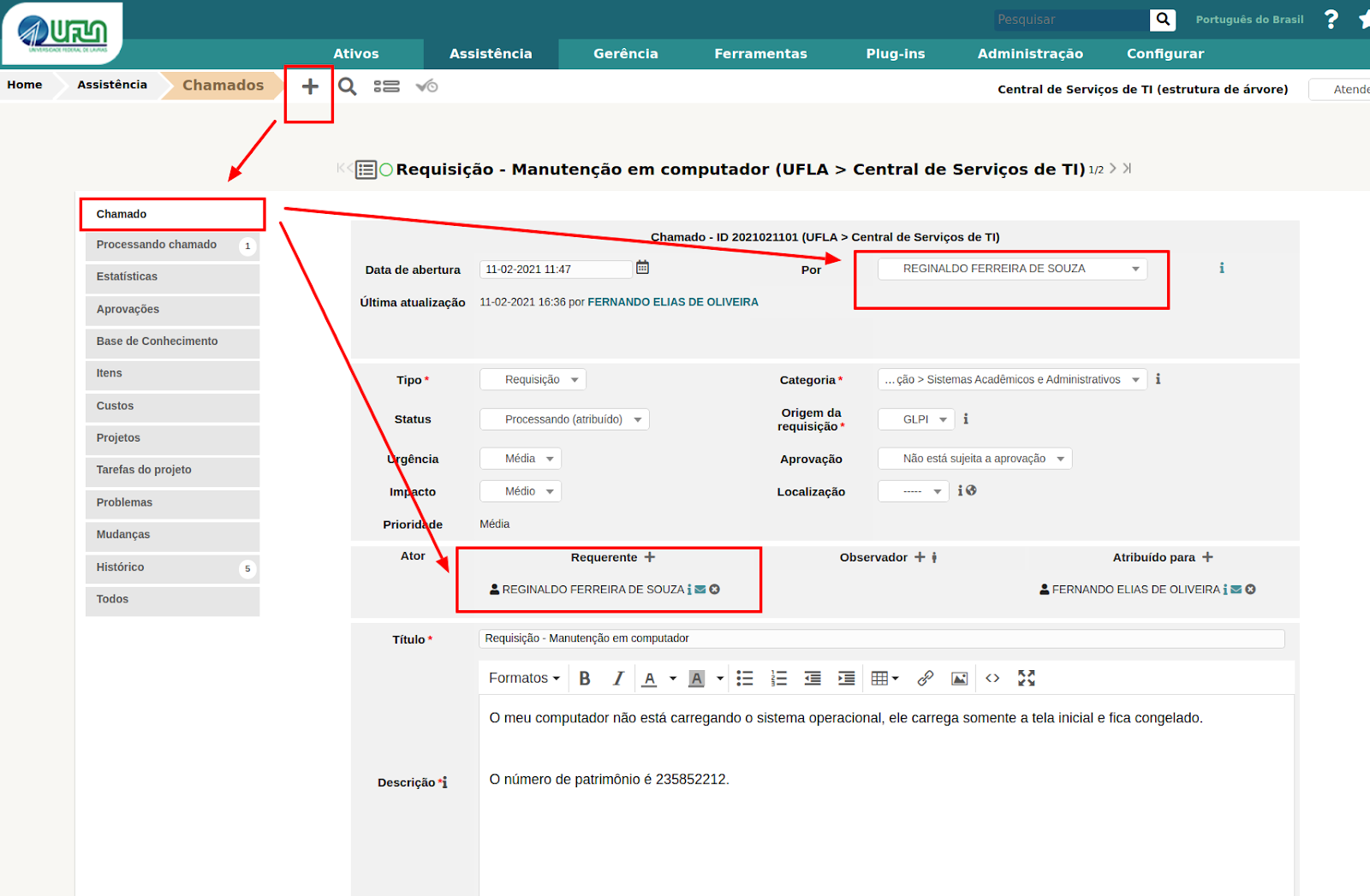
<span style="font-size: 11pt; font-family: Arial; color: #404040; background-color: #fcfcfc; font-weight: 400; font-style: normal; font-variant: normal; text-decoration: none; vertical-align: baseline; white-space: pre-wrap;">O GLPI permite criar chamadas para terceiros, inclusive para você, portanto é necessário acessar o caminho “Assistência &gt;&gt; Criar Chamado” , ou “Assistência &gt;&gt; Chamados &gt;&gt; e clicar na opção mais (+)” .</span>

<span style="font-size: 11pt; font-family: Arial; color: #404040; background-color: #fcfcfc; font-weight: 400; font-style: normal; font-variant: normal; text-decoration: none; vertical-align: baseline; white-space: pre-wrap;"><span style="border: none; display: inline-block; overflow: hidden; width: 625px; height: 409px;">![](https://lh6.googleusercontent.com/gzERxSJFHVwncyEOP3xMzChUcKMssookmv48GLMMQwhybfSZn1-uSnFgA4XHdighHtFSR8yagPaOX4E8AbZHj4kdOp7PugcykXn5DvaTZ06gVE_6JAScaXS0hAz_qHMv5n8CwYjxBhGaOtGMAcrX7A)</span></span>

<span style="font-size: 11pt; font-family: Arial; color: #404040; background-color: #fcfcfc; font-weight: 400; font-style: normal; font-variant: normal; text-decoration: none; vertical-align: baseline; white-space: pre-wrap;">Na criação do chamado é necessário se atentar nos campos: “</span><span style="font-size: 11pt; font-family: Arial; color: #ff00ff; background-color: #fcfcfc; font-weight: bold; font-style: normal; font-variant: normal; text-decoration: none; vertical-align: baseline; white-space: pre-wrap;">Por</span><span style="font-size: 11pt; font-family: Arial; color: #404040; background-color: #fcfcfc; font-weight: 400; font-style: normal; font-variant: normal; text-decoration: none; vertical-align: baseline; white-space: pre-wrap;">” (</span><span style="font-size: 11pt; font-family: Arial; color: #ff0000; background-color: #fcfcfc; font-weight: bold; font-style: normal; font-variant: normal; text-decoration: none; vertical-align: baseline; white-space: pre-wrap;">é quem vai avaliar o atendimento do chamado</span><span style="font-size: 11pt; font-family: Arial; color: #404040; background-color: #fcfcfc; font-weight: 400; font-style: normal; font-variant: normal; text-decoration: none; vertical-align: baseline; white-space: pre-wrap;">”, “Requerente” (em nome de quem ficará o chamado), “Tipo” (requisição ou incidente), “Categoria” (categoria de serviço do GLPI) e para quem será “Atribuído”.</span>

#### <span style="font-size: 16pt; font-family: Arial; color: #404040; background-color: #fcfcfc; font-weight: 400; font-style: normal; font-variant: normal; text-decoration: none; vertical-align: baseline; white-space: pre-wrap;">11 - Informações gerais  
  
</span>

- <span style="font-size: 11pt; font-family: Arial; color: #404040; background-color: #fcfcfc; font-weight: 400; font-style: normal; font-variant: normal; text-decoration: none; vertical-align: baseline; white-space: pre-wrap;">O GLPI informa por e-mail sobre todas as ocorrências nos chamados, por e-mail. </span>
- <span style="font-size: 11pt; font-family: Arial; color: #404040; background-color: #fcfcfc; font-weight: 400; font-style: normal; font-variant: normal; text-decoration: none; vertical-align: baseline; white-space: pre-wrap;">Esta é a ferramenta oficial para atendimento de serviços da DGTI e todo atendimento deve estar registrado nela.</span>
- <span style="font-size: 11pt; font-family: Arial; color: #404040; background-color: #fcfcfc; font-weight: 400; font-style: normal; font-variant: normal; text-decoration: none; vertical-align: baseline; white-space: pre-wrap;">Quinzenalmente é feita a vistoria dos chamados atrasados para análise do motivo de atraso, os técnicos e coordenadores são notificados sobre os atrasos.</span>
- <span style="font-size: 11pt; font-family: Arial; color: #404040; background-color: #fcfcfc; font-weight: 400; font-style: normal; font-variant: normal; text-decoration: none; vertical-align: baseline; white-space: pre-wrap;">Os serviços adicionados no GLPI devem estar no catálogo de serviços de TI da UFLA, aprovado pelo CIGOV.</span>

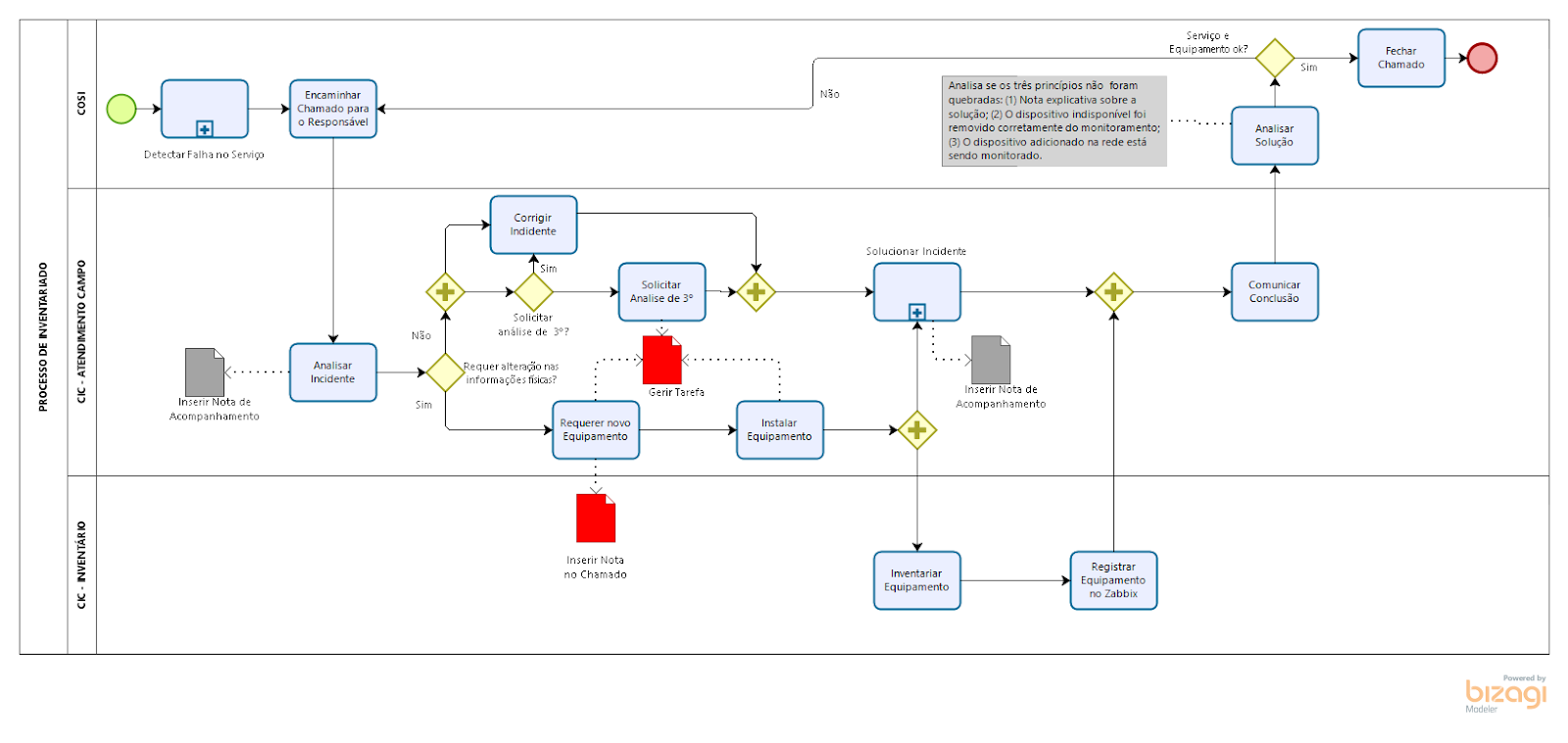
#### <span style="font-size: 16pt; font-family: Arial; color: #404040; background-color: #fcfcfc; font-weight: 400; font-style: normal; font-variant: normal; text-decoration: none; vertical-align: baseline; white-space: pre-wrap;">12 - Modelo para controle das câmeras e switchs no GLPI &amp; Zabbix</span>

<span style="font-weight: normal;"> </span>

<span style="font-size: 11pt; font-family: Arial; color: #404040; background-color: #fcfcfc; font-weight: 400; font-style: normal; font-variant: normal; text-decoration: none; vertical-align: baseline; white-space: pre-wrap;"><span style="border: none; display: inline-block; overflow: hidden; width: 625px; height: 296px;">![](https://lh5.googleusercontent.com/SbI4ctLarCcPi3sCRlN3CYhR_7g_jQ6ASR4jQjcbCGimIz1L6LQtxb5prQMgoowO5IbiHDRU54UUx-V-nacg2Bn3IXTig-kK-krKutu_1gZAiC8ZhJAT7fmltmYc9nhfHO0xUOBfx89vJPAF_ESMxw)</span></span>

#### <span style="font-size: 16pt; font-family: Arial; color: #404040; background-color: #fcfcfc; font-weight: 400; font-style: normal; font-variant: normal; text-decoration: none; vertical-align: baseline; white-space: pre-wrap;">12 - Documento antigo com as instruções</span>

<span style="font-size: 11pt; font-family: Arial; color: #404040; background-color: #fcfcfc; font-weight: 400; font-style: normal; font-variant: normal; text-decoration: none; vertical-align: baseline; white-space: pre-wrap;"><span style="border: none; display: inline-block; overflow: hidden; width: 625px; height: 296px;">  
[https://docs.google.com/document/d/1\_s4HFHrldtjQknytRQqyUVjH-ybKUdz7A2sNocyDpJA/edit?usp=sharing](https://docs.google.com/document/d/1_s4HFHrldtjQknytRQqyUVjH-ybKUdz7A2sNocyDpJA/edit?usp=sharing)  
</span></span>